

ThingsOne SmartCardTag 비활성화 및 재활성화 방법
미확인 추적기 알림을 받거나 위치 공유를 중단해야 하는 경우, ThingsOne SmartCardTag 를 비활성화 할 수 있습니다. 비활성화 시 태그는 구글 '기기 찾기(Find My Device)' 네트워크로의 정보 전송을 중단하며, 소유자는 더 이상 해당 태그를 추적할 수 없습니다.
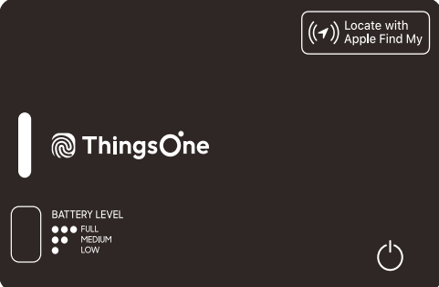
■ 비활성화 방법
- ThingsOne SmartCardTag 우측 하단에 위치한 버튼을 찾습니다.
- 버튼을 1회 눌렀다 뗀 후 빠르게 다시 누른 상태로 5초간 길게 누릅니다.
- 비프음이 2번 울린 후 손을 떼면 확인음과 함께 프로세스가 완료됩니다.
참고: 배터리는 태그 내부 일체형으로 성형(molded)되어 있어 분리가 불가능합니다.
■ 재활성화 방법
버튼을 한 번 누릅니다. 확인음이 울리면 태그가 다시 활성화된 상태입니다.
If you receive an unknown tracker alert or need to stop sharing your location, you can disable the ThingsOne SmartCardTag. Once disabled, the tag stops reporting to Google’s Find My Device network, and the owner can no longer track it.
■ How to Disable
- Locate the button on the lower right of the ThingsOne SmartCardTag.
- Quickly Press the button once, then Press and Hold it for five seconds.
- One confirmation beep will sound, and another confirmation beep will sound after five seconds.
Note: The battery is built-in and molded inside the tag, so it cannot be removed.
■ How to Re-enable
Press the button once. You will hear a confirmation beep indicating the ThingsOne SmartCardTag is active again.